
Absences
Absences in smenso represent periods during which a user is not available for work, such as vacation, sick leave, public holidays, or other types of time off. Absences are always assigned to a specific user and follow clearly defined validation and approval rules to ensure accurate capacity and availability planning across the workspace.
Absences are visible in workload views, timesheets, and people's details. They directly influence scheduling and capacity calculations and therefore play an important role in project and portfolio planning.
Available Endpoints
Integration JSON API
| Action | Method | Endpoint |
|---|---|---|
| Get all absences | GET | /api/integration/absence/json |
| Create absences | POST | /api/integration/absence/json |
| Update absences | PUT | /api/integration/absence/json |
| Delete absence | DELETE | /api/integration/absence/json/{id} |
Integration XML API
| Action | Method | Endpoint |
|---|---|---|
| Create/update absences | POST | /api/integration/absence |
| Delete absence | DELETE | /api/integration/absence/{id} |
Reporting API
| Action | Method | Endpoint |
|---|---|---|
| Get all absences (CSV) | GET | Reporting endpoint |
| Get all absences (CSV, advanced filters) | POST | Reporting endpoint |
| Get absences (Excel) | GET | Reporting endpoint |
| Get absences (Excel, advanced filters) | POST | Reporting endpoint |
Related Endpoints (Settings)
| Action | Method | Endpoint |
|---|---|---|
| Get absence types | GET | Settings → Absence types |
| Create absence types | POST | Settings → Absence types |
| Update absence types | PUT | Settings → Absence types |
| Delete absence type | DELETE | Settings → Absence types |
Key Fields
| Field | Type | Required | Description |
|---|---|---|---|
userId | string | ✅ | User ID or email of the user this absence belongs to |
absenceTypeId | string | ✅ | Absence type ID or name (e.g. "Vacation") |
startDate | date-time | ✅ | The date the absence begins |
endDate | date-time | ✅ | The date the absence ends (must be ≥ startDate) |
status | string | ❌ | submitted, approved, rejected – only relevant for types that require approval |
comment | string | ❌ | Optional comment |
startDateMinutes | number | ❌ | Minutes on the start day. Defaults to the user's configured daily capacity. |
endDateMinutes | number | ❌ | Minutes on the end day. Defaults to the user's configured daily capacity. |
locked | boolean | ❌ | Whether the absence is locked for editing |
tempId | string | ❌ | Temporary ID to correlate batch results |
externalId | string | ❌ | External system reference |
IfstartDateMinutesorendDateMinutesexceed the user's daily capacity, smenso automatically caps them.
Example: Create an Absence
POST /api/integration/absence/json
Content-Type: application/json
Authorization: Bearer {token}{
"timezoneId": "W. Europe Standard Time",
"absence": [
{
"userId": "[email protected]",
"absenceTypeId": "Vacation",
"startDate": "2025-07-14",
"endDate": "2025-07-18",
"comment": "Summer vacation"
}
]
}Response:
{
  "ticketId": "a1b2c3d4-..."
}
Poll the ticket to confirm the absence was created:
GET /api/integration/status/json/{ticketId}Partial-day absence
To create a half-day absence (e.g. afternoon off), specify the minutes:
{
  "timezoneId": "W. Europe Standard Time",
  "absence": [
    {
      "userId": "[email protected]",
      "absenceTypeId": "Vacation",
      "startDate": "2025-08-01",
      "endDate": "2025-08-01",
      "startDateMinutes": 240,
      "endDateMinutes": 240,
      "comment": "Afternoon off"
    }
  ]
}
Absence Types
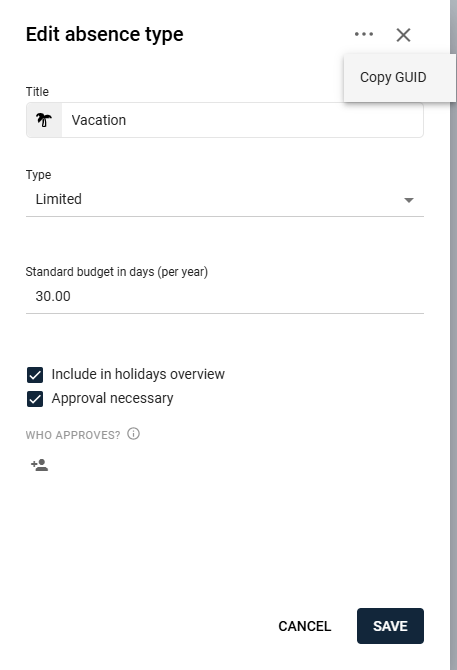
Every absence is assigned to an absence type. Absence types are configured at the workspace level and define how categories of absences are interpreted and validated.
| Property | Description |
|---|---|
| Limited vs. Unlimited | Limited types include a contingent (e.g. 30 vacation days/year). Unlimited types have no predefined limit. |
| Approval required | Some types require approval. One or more approvers can be assigned. |
| Display properties | Labels, icons, and colors can be configured by workspace administrators. |
You can retrieve absence types programmatically via Get absence types, or find the absenceTypeId in the UI under Settings > Absence types.
Holiday Calendars
smenso supports multiple holiday calendars to reflect different regional or national holiday structures:
- Calendars can be generated automatically or maintained manually.
- Holidays and events may span one or several days.
- Holiday calendars can be assigned to specific users.
Assigned calendars automatically influence absence calculations and user capacity. Public holidays are considered based on the user's configured calendar – no manual handling is needed in API requests.
Member Settings Impact
Each member has individual settings that directly affect absence handling:
| Setting | Effect |
|---|---|
| Working hours | Daily capacity in minutes/hours per day. If an absence doesn't provide explicit startDateMinutes/endDateMinutes, smenso uses these values. |
| Assigned holiday calendar | Determines which holidays apply and how workload is calculated. |
| Personal absence contingents | For limited absence types: individual allowance (e.g. annual vacation days). Used for validation and reporting. |
These settings ensure that absence calculations reflect real organizational rules and local working conditions.
Validation Rules
Absences must comply with strict consistency rules. Violations will cause the operation to fail.
No overlapping absences
Absences for the same user must not overlap in time. When multiple absences are submitted in a single batch request, validation happens after all operations are applied.
Holiday handling
Public holidays are considered automatically based on the user's configured holiday calendar. No manual timezone or offset adjustments are required.
Approval logic
Types that require approval:
- The absence enters the
submittedstate by default (unless another valid status is provided). - When an approved absence is updated, it returns to
submittedunless another valid status is explicitly set.
Types without approval:
- The
statusfield is ignored. Any value supplied will be disregarded.
Date & working time rules
- Start date must be earlier than or equal to the end date.
- If
startDateMinutes/endDateMinutesare omitted, the user's daily capacity is applied. - If explicitly provided minutes exceed capacity, smenso automatically caps them.
User scope
Absences always belong to a user, not a project.
Time Zones
Absences follow smenso's unified timezone behavior:
- Provide the
timezoneIdin the request (e.g."W. Europe Standard Time"). - Do not include manual offsets like
+01:00or+02:00. - If no offset is supplied, smenso determines the correct one automatically.
- Daylight saving time is handled internally.
This behavior is consistent across UI, JSON API, XML API, and Reporting API. See Dates & Time zones for details.
Permissions
Absence permissions follow smenso's global rules:
- Users may edit their own absences if their role allows it.
- Managers or administrators may edit absences of other users depending on workspace configuration.
- API operations inherit the permissions of the user who owns the API token.
If a user cannot perform an action in the UI, the API will not allow it either.
Further Reading
- Absences in the smenso Help Center – UI setup, workflows, and permissions
- Integration Tickets – How async processing works
- Dates & Time zones – Timezone handling across APIs
- Member Settings – Working hours and calendar configuration
Updated 7 months ago