
The POST project endpoint can be used to create new projects or update existing ones. If a project GUID is provided in the XML payload, the corresponding project is updated. If no GUID is provided, a new project is created.
| Time | Status | User Agent | |
|---|---|---|---|
Retrieving recent requests… | |||
Request Body
The request body must be an XML document with a root element Projects. Each project is sent as a Project element.
<Projects>
  <Project>
    ...
  </Project>
</Projects>
Create vs. update
- Create:
Idis empty: TheIdelement must be present in every Project item. For creates, include an empty element (for exampleIdwith no value). Omitting the Id element will result in a validation error.
<Projects>
  <Project>
    <Id></Id>
    <Title><![CDATA[My Project]]></Title>
    <StartDate>03.05.2023</StartDate>
    <EndDate>09.05.2023</EndDate>
  </Project>
</Projects>
- Update:
Idcontains the existing project GUID.
Archived projects cannot be updated. If an update is attempted for an archived project, the project may not be found and the request can be treated as a create, resulting in a new project being created (for example with a default title such as “New project”). To avoid unintended creates, ensure the target project is not archived before sending updates.
Body Fields
| Name | Type | Description |
|---|---|---|
| Id | GUID | The GUID of the project |
| Benefit | string | The Project Benefit field from the project master data |
| Budget | double | The Budget field from the project master data |
| DepartmentId | integer | |
| Description* | string | The Description field of the project |
| StartDate | string | The Project Start field from the project master data. Fromat date-time. |
| EndDate | string | The Project End field from the project master data. Format date-time. |
| Goal | string | The Project Goal field from the project master data |
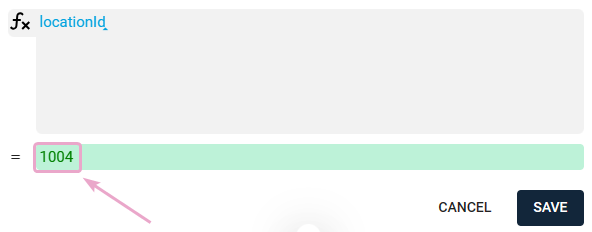
| LocationId* | integer | The Location field from the project master data. The LocationId can be accessed via a flavor of type "Formula"* |
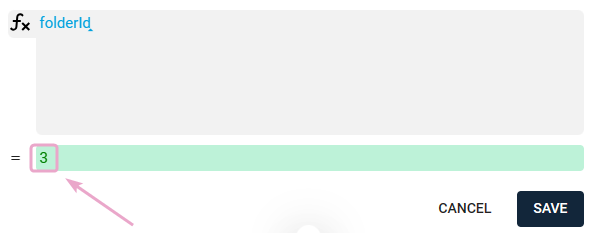
| PhaseId* | integer | The Project Folder field from the project master data. The PhaseId can be accessed via a flavor of type "Formula"* |
| ProjectManager | GUID | The Project Manager field from the project master data |
| Title | string | The title of the project |
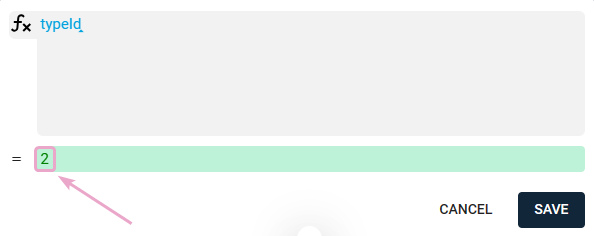
| TypeId* | integer | The Project Type field from the project master data. The TypeId can be accessed via a flavor of type "Formula"* |
| WorkflowId | GUID | The GUID of a custom workflow that is defined in the project master data as the default for tasks |
| TaskTemplateId | GUID | The GUID of the task template that is defined as default in the project master data |
| LogoDocumentId | GUID | The GUID of the logo used for print outputs and defined in the project master data |
| Private | GUID,GUID,GUID,... (from people) | The comma-separated GUIDs of people who are authorized in the private project |
| TempId | string | This is not a database field. It is used for the assignment of the GUID of the created elements to the element in the call. The result is then delivered in the request ticket. The GUID will only be delivered in the result ticket for elements with TempId. |
Additions:
-
Description: Additionally use CDATA if HTML
<![CDATA[Description]]>

Allowed Tags: "h1", "br", "ul", "li", "a", "b", "p", "h2", "h3", "h4", "h5"

Allowed Attributes: "href"
-
The LocationId can be accessed via a flavor of type "Formula" (small 'l', capital 'I'):
- The PhaseId can be accessed via a flavor of type "Formula" (small 'f', capital 'I'):
- The TypeId can be accessed via a flavor of type "Formula" (small 't', capital 'I'):
Examples
<Projects>
  <Project>
    <Id>project-guid</Id>
    <Title><![CDATA[Titel des Projekts]]></Title>
    <StartDate>03.05.2023</StartDate>
    <EndDate>09.05.2023</EndDate>
    <Description><![CDATA[Beschreibung des Projekts]]></Description>
    <TypeId>7</TypeId>
    <FolderId>1</FolderId>
    <LocationId>1017</LocationId>
    <Private>person-guid,person-guid</Private>
  </Project>
</Projects>
Ticket responses (async processing)
This endpoint returns a ticketId. Poll the status endpoint until the ticket reaches a terminal state.
Status endpoints
XML: GET /skyisland/api/integration/status/ticketId
The system returns (via ticket status)
- The GUID of the created or updated project
- Validation messages and warnings
- Errors preventing processing
Do not include offsets (for example +02:00) in date values. The API determines the correct offset automatically based on the provided date and workspace configuration.
You may provide timezoneId on the root element if you want to explicitly set a time zone. See Dates & Time zones.
OK
Unauthorized
Forbidden